Platform
Lattice
Full cross-domain solution software. Orchestrate file transfers, configure ENS pipelines, enforce human review policies, and operate your data diode deployment from a unified web console, built for air-gapped and critical infrastructure networks.
Data volume (file transfer, last 24h)
Transfer events by interval (last 24h)
Tickets by status
Connection rules
12 rules · 12 enabled · 11 running
- Running11
- Stopped1
Pipelines & tools
46 pipeline stages across 12 rules — tool stages below.
| Rule | Status | Role / transport | Stages | Traffic |
|---|---|---|---|---|
| SCADA Modbus receiver (UDP)485374d7-00a6-41c0-b328-6911ad58cd5e | running | receiver · tcplisten 9000 → target 502 | 3 | 148.8 MB/s 391.2 GB session |
| Substation DNP3 senderd0c02dcf-438c-4788-a086-2ac8430ee2a2 | running | sender · tcplisten 20000 → target 9100 | 4 | 171.7 MB/s 479.6 GB session |
| Plant syslog forwarder46a11cae-9de1-40fa-99cc-c64656ecca7f | running | sender · tcplisten 1514 → target 9514 | 4 | 194.5 MB/s 568.1 GB session |
| Tactical BFT position feedc9c64178-50df-4bf5-8246-83d37a47cbd1 | running | sender · tcplisten 8087 → target 9807 | 5 | 217.4 MB/s 656.6 GB session |
| ISR metadata exportd4365548-5d42-410c-8b48-a14460266c72 | running | sender · tcplisten 5004 → target 9504 | 4 | 240.3 MB/s 745.1 GB session |
| Netflow export6ef361da-3fb7-49d5-b698-ea8142f16449 | running | sender · tcplisten 2055 → target 9205 | 4 | 263.2 MB/s 833.5 GB session |
Key metrics
Tickets
File transfers
Files
Data (file transfer)
Connection rules
Pipeline throughput
Diode bytes (pipelines)
Download events
Files downloaded
Memory
Disk (/var/lib/lattice)
Load (1m)
Activity log
- 10:12:00FTFile transfer NORTHPIER-ZONE-848 completed (3 files)
- 10:10:00ConnConnection rule "SCADA Modbus receiver (UDP)" started
- 10:07:00FTFile transfer CANYON-SEG-845 completed with errors (2 of 3 files)
- 09:55:00ConnConnection rule "Substation DNP3 sender" started
Overview
The operations console for every cross-domain scenario
Hardware diodes enforce one-way flow at the physical layer. Lattice is the operations layer — transfers, pipelines, review, and audit — from one console in your protected enclave.
The platform is the same everywhere. Which capabilities matter most depends on your sector — mapped on the right.
By industry
- 01Defense & IntelligenceReviewer attestation and custody records for classified movement.Human Review · Provenance · Identity & mTLS
- 02SCADA & OTProtocol bridging and live visibility across OT perimeters.ENS Connections · System Overview · Inspection
- 03Financial ServicesTicket-level control and audit trails for regulated data movement.File Transfer · Admin & Audit · Provenance
- 04Crypto & High-Value AssetsAuthorized, inspectable transfers for air-gapped asset workflows.File Transfer · Inspection · Audit Trail
Capabilities
Everything you need to operate a CDS
File transfer, protocol bridging, inspection, human review, identity, and administration — from one platform.
System Overview
Real-time KPIs for file transfer volume, connection throughput, ticket status, host resources, and an activity feed — configurable from 1 to 168 hours, on either side of the boundary.
Connection Orchestration
Visual ENS pipeline rules for Modbus TCP, raw UDP/TCP, and custom multi-stage flows — with live traffic sparklines, import/export, and per-rule start/stop.
Ticket-Based File Transfer
Multi-file uploads with SHA-256 hashing, chunked transfer, recipient addressing, and RSA-4096 signed JWTs that authorize every cross-domain movement with bilateral revocation tracking.
Ticket Provenance
Per-file timelines from upload through inspection, diode transit, antivirus, human review, and pickup — with hashes, disposition codes, and cross-domain audit context.
Reliable Human Review
Policy-driven review queues with assignment, attestation, duplicate detection, rich comments, notifications, and optional download-before-approve enforcement.
Admin & Audit
24-permission RBAC with custom roles, user approval workflows, runtime system settings, and a tamper-evident audit chain with verification endpoint.
Content Inspection
Defense-in-depth pipeline: magic-byte detection, MIME/extension policy, Google Magika ML typing, dirty-word filtering, and configurable AV scanning — with block, warn, or quarantine per stage.
mTLS Non-Repudiation
Bind uploads and downloads to client certificates (CAC, YubiKey, or software certs). Identity is recorded on every transfer and carried across the diode in the manifest.
Identity & Access
Local accounts or LDAP/AD, email verification, session management, password policy, personal access tokens, and registration approval before first login.
Security
Defense in depth at every layer
Cryptographic authorization, content inspection, antivirus, non-repudiation, and auditable operations — enforced server-side in your protected enclave.
Cryptographic gatekeeping
Every file transfer requires cryptographic authorization before data crosses your boundary. Revocation is tracked so pulled approvals are honored throughout the deployment.
Multi-stage content inspection
Files are analyzed with libmagic, MIME/extension consistency checks, Google Magika ML classification with configurable certainty thresholds, and optional dirty-word filtering — on the air-gapped side before AV, and optionally at upload on the external network.
Air-gapped AV updates
AV definition updates can be delivered into the protected network as approved system tickets — no outbound internet required on the air-gapped side.
Tamper-evident audit
Admin actions are recorded in a hash-chained audit log with optional HMAC signing. Operators can verify chain integrity via the API. Per-user audit history is available in Profile.
Client certificate binding
Optional mandatory mTLS for uploads and data access binds every transfer to a cryptographic identity. Certificate enrollment, multi-binding limits, and fingerprint-based identification via nginx integrate with CAC, YubiKey, and software certificates.
Quarantine & recovery
Failed inspection, policy violations, and malware are quarantined with reason codes — infected, policy_mime, policy_words, policy_magika_certainty, and more. Admins can release individual files or bulk-quarantine on the air-gapped side when investigation warrants it.
Platform
See Lattice in action
A walkthrough of the core views operators use every day.
Overview
Single-pane visibility into your node
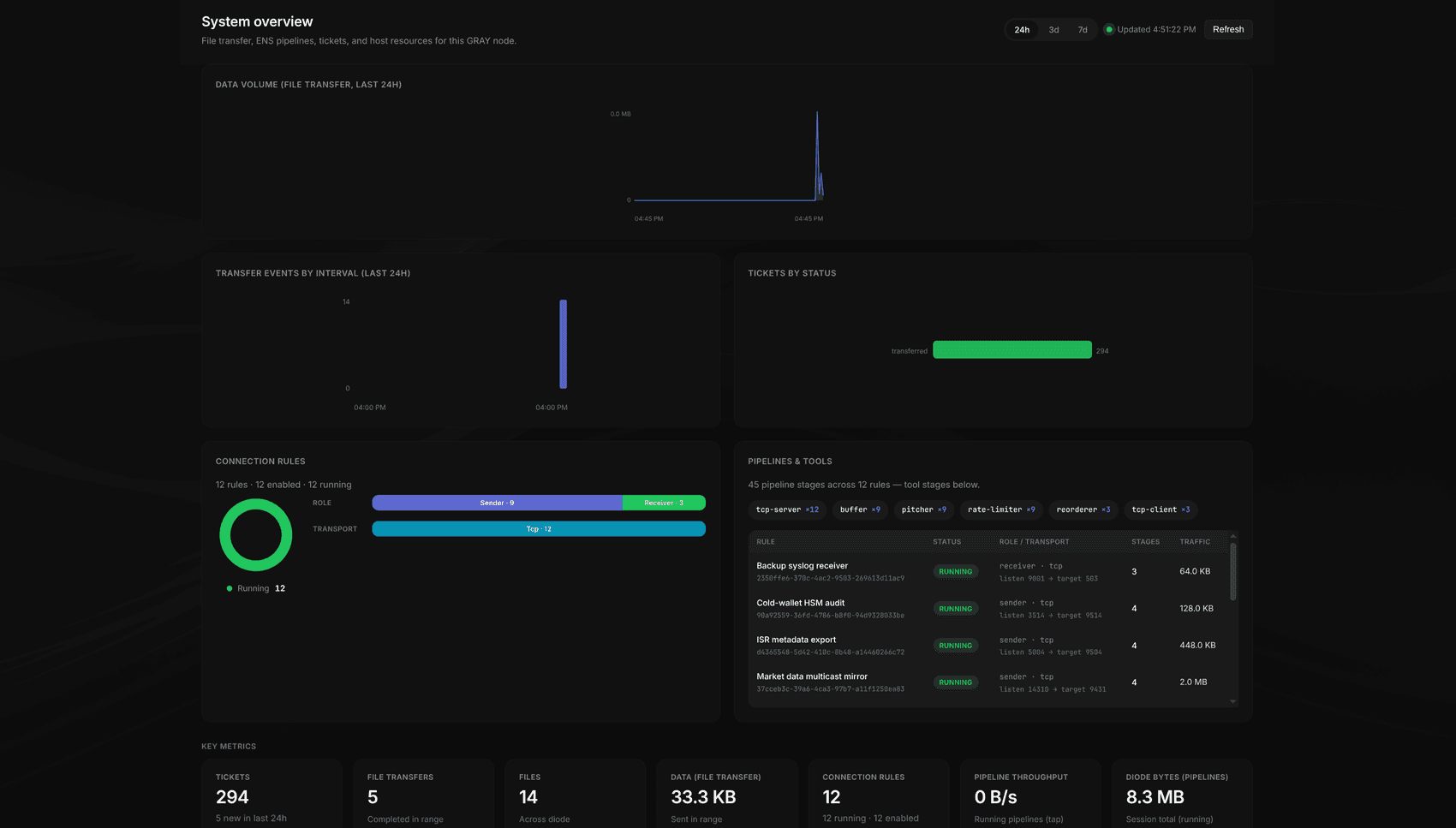
The system overview shows file transfer volume, transfer events, tickets by status, and connection rule health at a glance. Drill into pipeline stages (ens-catcher, ens-pitcher, ens-reorderer, and more) and see live traffic per rule.
Overview
Single-pane visibility into your node
The system overview shows file transfer volume, transfer events, tickets by status, and connection rule health at a glance. Drill into pipeline stages (ens-catcher, ens-pitcher, ens-reorderer, and more) and see live traffic per rule.
System overview: file transfer, ENS pipelines, tickets, and host resources on the external network.
Connections
Configure ENS pipelines visually
Define sender and receiver rules for Modbus TCP, raw UDP/TCP, syslog, and custom protocols. Compose multi-stage pipelines with catchers, buffers, rate limiters, and tee branches — then enable, disable, and monitor each rule with live traffic sparklines.
Connections
Configure ENS pipelines visually
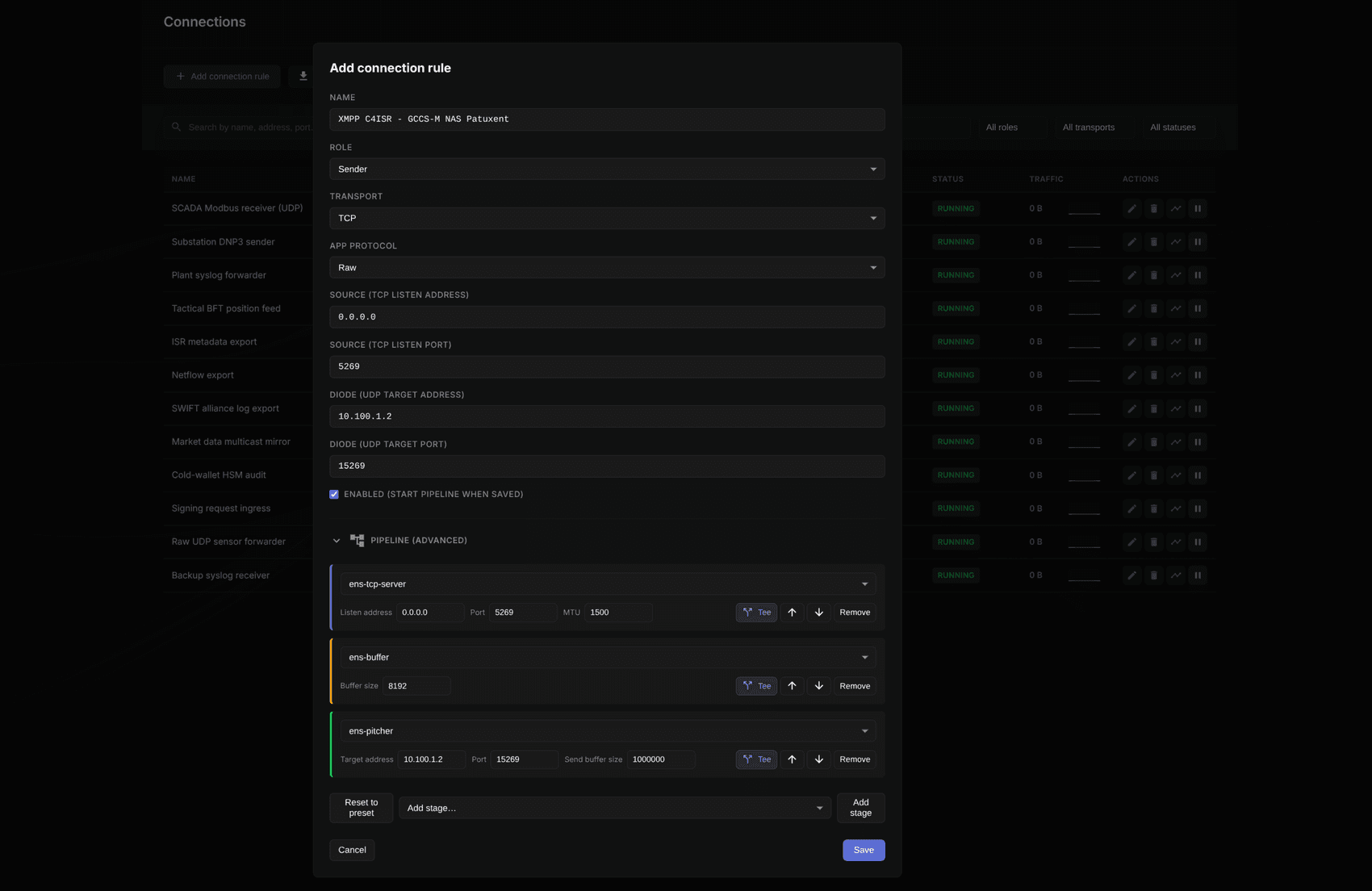
Define sender and receiver rules for Modbus TCP, raw UDP/TCP, syslog, and custom protocols. Compose multi-stage pipelines with catchers, buffers, rate limiters, and tee branches — then enable, disable, and monitor each rule with live traffic sparklines.
Connections: configure role, transport, diode targets, and compose ENS pipeline stages visually.
File Transfer
Every transfer tracked by ticket
Browse completed and in-progress tickets across your deployment. Search by file name, SHA256 hash, ticket ID, or date. Upload from the console or drive transfers programmatically via the API, then track disposition through every stage.
File Transfer
Every transfer tracked by ticket
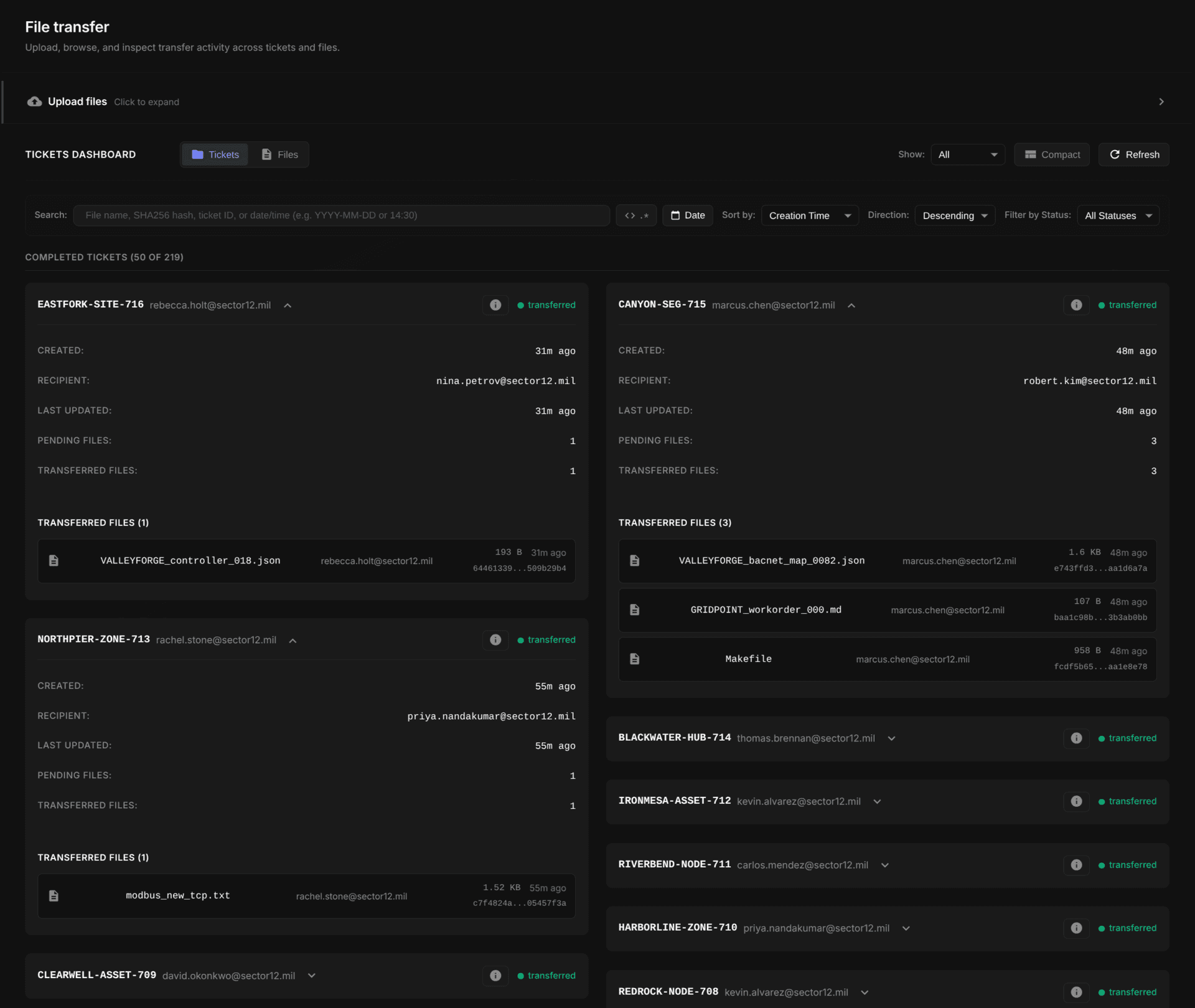
Browse completed and in-progress tickets across your deployment. Search by file name, SHA256 hash, ticket ID, or date. Upload from the console or drive transfers programmatically via the API, then track disposition through every stage.
File transfer: upload, browse, and inspect transfer activity across tickets and files.
Files
Inspect every file in a transfer
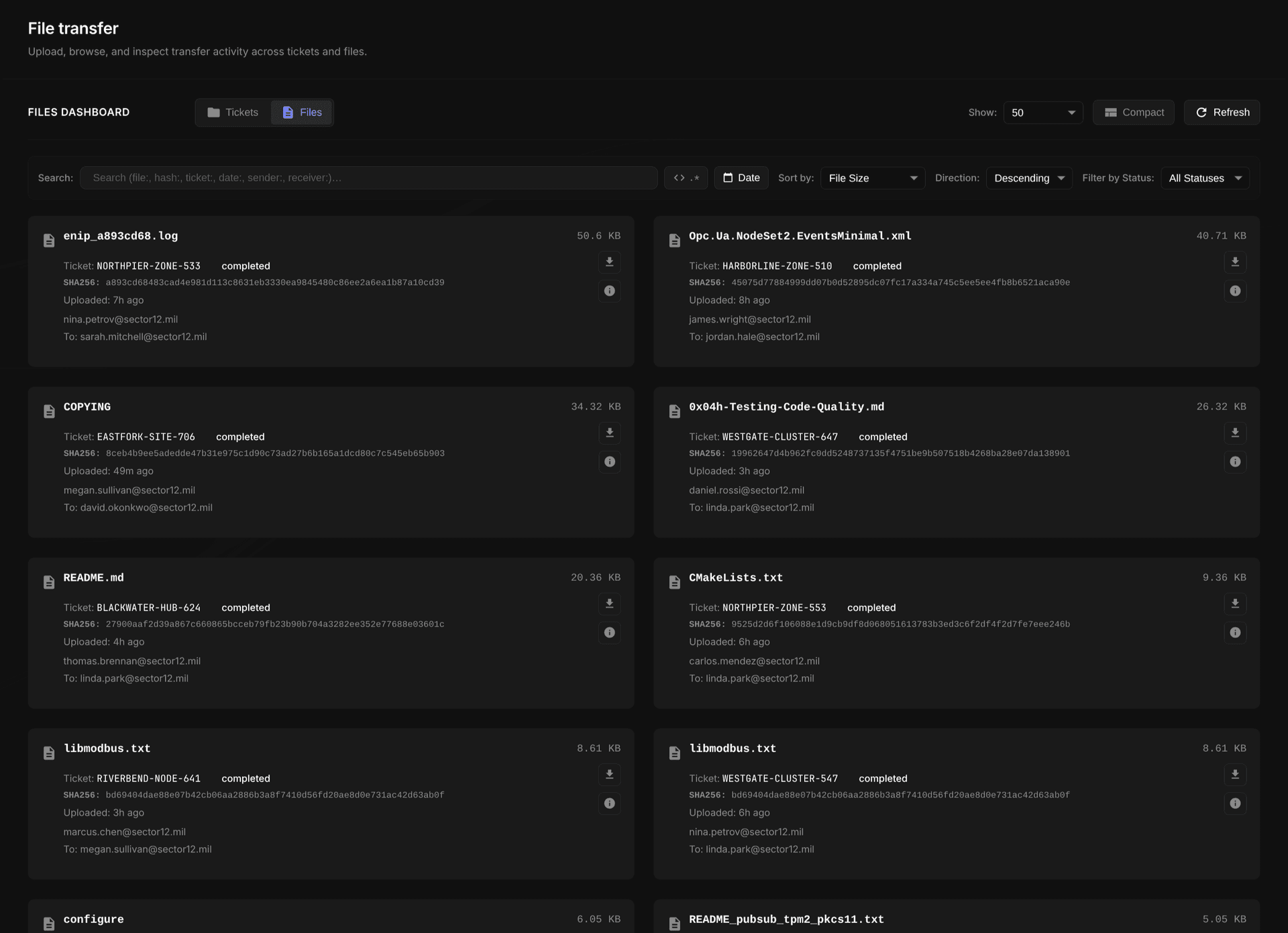
Switch to the files view to see individual file metadata, hashes, and disposition within each ticket. Search and filter across your entire transfer history.
Files
Inspect every file in a transfer
Switch to the files view to see individual file metadata, hashes, and disposition within each ticket. Search and filter across your entire transfer history.
Files view: per-file metadata, hashes, and disposition within each ticket.
Provenance
See exactly where every file has been
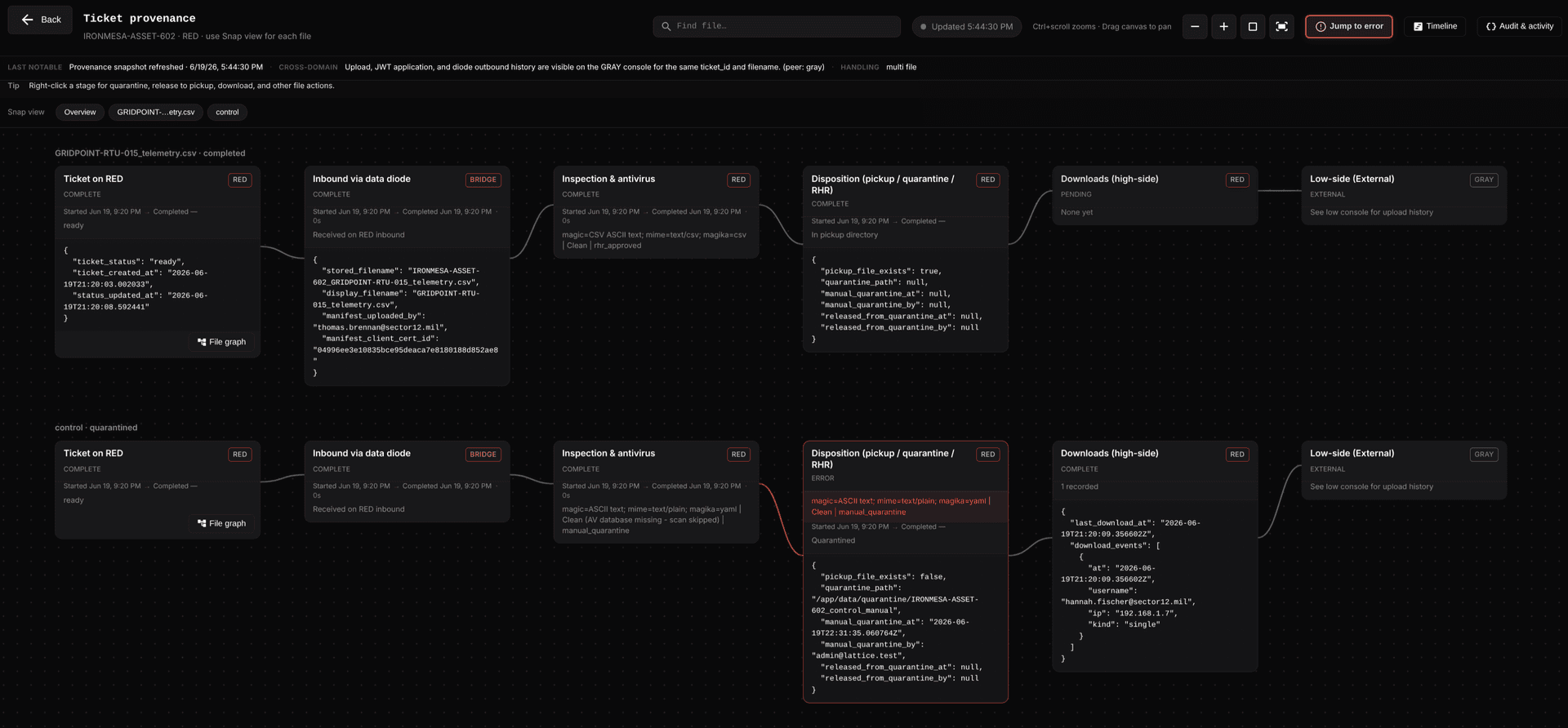
The provenance view shows where each file is in the pipeline: upload, JWT authorization, packaging, diode crossing, inspection, AV, human review, and release. Every event is hash-chained so you have a tamper-evident custody record from processing through storage. When something needs attention, quarantine or release a file, find it on disk, or jump straight to the failure.
Provenance
See exactly where every file has been
The provenance view shows where each file is in the pipeline: upload, JWT authorization, packaging, diode crossing, inspection, AV, human review, and release. Every event is hash-chained so you have a tamper-evident custody record from processing through storage. When something needs attention, quarantine or release a file, find it on disk, or jump straight to the failure.
Ticket provenance: end-to-end flow from upload through the diode to inspection and disposition.
Human Review
Reliable Human Review when policy demands it
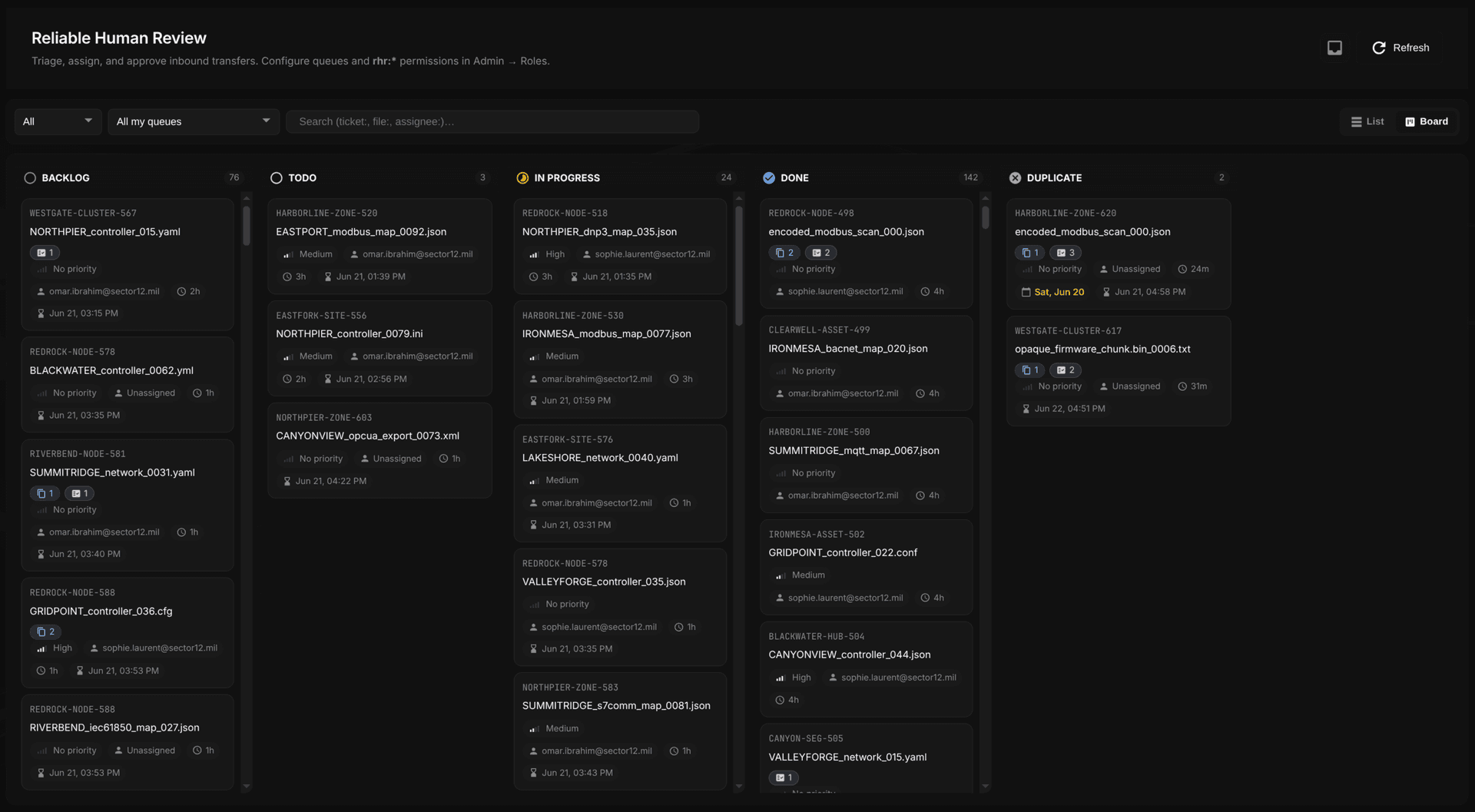
RHR queues let operators triage inbound transfers before release. Policy routes files by extension, size, or uploader into named queues with configurable priorities and expiration times. Assign reviewers to queues by mission set, role, or other criteria — then triage, comment, detect duplicates, and approve or deny.
Human Review
Reliable Human Review when policy demands it
RHR queues let operators triage inbound transfers before release. Policy routes files by extension, size, or uploader into named queues with configurable priorities and expiration times. Assign reviewers to queues by mission set, role, or other criteria — then triage, comment, detect duplicates, and approve or deny.
Reliable Human Review: triage and assign inbound transfers across review queues.
Review Detail
Policy-enforced approval workflows
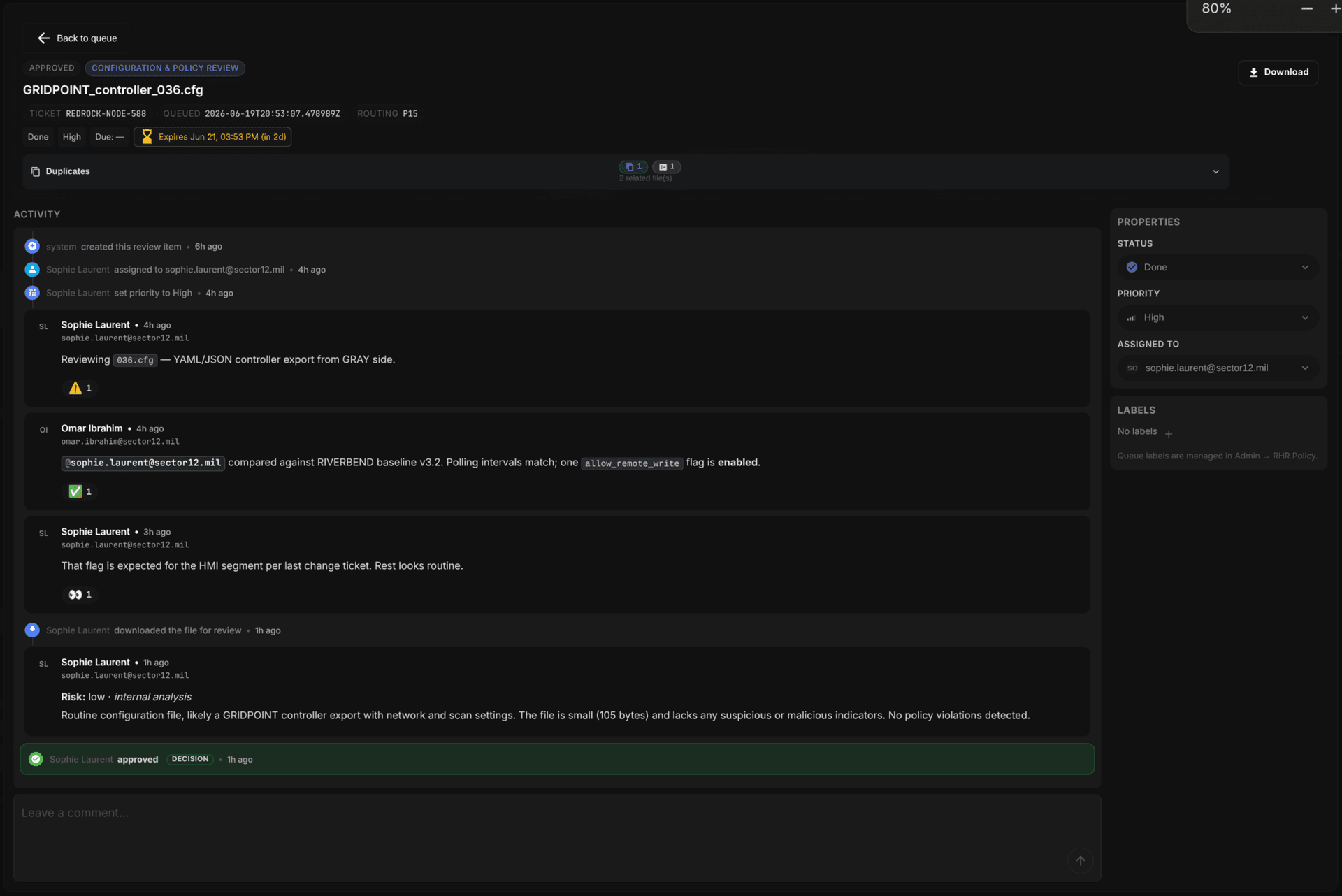
Each review item shows ticket metadata, priority, assignment history, and a full activity log. Because RHR lives inside Lattice, reviewers collaborate right where the files and audit record are — no handoff to a separate ticketing system or integration to maintain. Comment, notify, attest, and approve or deny without breaking the custody chain.
Review Detail
Policy-enforced approval workflows
Each review item shows ticket metadata, priority, assignment history, and a full activity log. Because RHR lives inside Lattice, reviewers collaborate right where the files and audit record are — no handoff to a separate ticketing system or integration to maintain. Comment, notify, attest, and approve or deny without breaking the custody chain.
Review detail: policy requires download before approve or disapprove actions unlock.
Administration
Users, roles, and audit at your fingertips
Manage users and roles, configure RHR policies and queue labels, tune upload limits and inspection thresholds, and review the full audit log. Custom roles let you compose permission bundles for reviewers, operators, and admins.

Administration
Users, roles, and audit at your fingertips
Manage users and roles, configure RHR policies and queue labels, tune upload limits and inspection thresholds, and review the full audit log. Custom roles let you compose permission bundles for reviewers, operators, and admins.
Admin: users, roles, audit log, and system configuration.
Architecture
Built for air-gapped operations
Lattice is the operations console for your protected enclave — deployed at the hardware-enforced boundary where your security policy meets unidirectional links.
Protected network
Where Lattice runs
- Ticket-based file transfer
- Content inspection & AV
- Reliable Human Review
- ENS pipeline orchestration
- Tamper-evident audit
Hardware boundary
Expanse data diode
- Physics-enforced one-way flow
- No reverse path
- Ingress or egress per policy
- SFP+ fiber link
FAQ
Common questions
What is Lattice?
Lattice is Domain Systems' cross-domain solution software platform. It provides a unified web console for ticket-based file transfer, ENS connection orchestration, content inspection, Reliable Human Review, provenance tracking, RBAC, and tamper-evident audit — built for critical infrastructure and high-assurance environments.
What is Reliable Human Review (RHR)?
RHR is Lattice's human-in-the-loop workflow on the air-gapped network. Clean inbound files can be held in staging until a reviewer in an assigned queue approves release. Policy routes files by extension, size, or uploader; reviewers can assign, comment, detect duplicates, and attest to decisions. Download-before-approve is optional per deployment.
How does Lattice differ from the Expanse Network Stack?
ENS is the modular toolkit of command-line utilities for protocol bridging across a data diode. Lattice is the enterprise platform that orchestrates ENS through a web UI, manages ticket-based file transfer with JWT authorization, enforces review and inspection policy, and provides provenance and audit trails.
How does file transfer authorization work?
Transfers require an approved ticket. Lattice cryptographically authorizes each movement before data crosses your boundary, with revocation tracked so pulled approvals are honored. Files pass content inspection and AV scanning on the protected side and may enter RHR before release to authorized users.
What authentication options does Lattice support?
Lattice supports local accounts (Argon2id-hashed, with admin approval before first login) or LDAP/AD with group filtering. Email-based login and verification are available. Sessions support idle timeout and remember-me. Personal access tokens with scoped permissions can be enabled for API and automation use cases.
How does content inspection work?
An optional shared inspection pipeline runs magic-byte detection, MIME/extension consistency checks, Google Magika ML file typing with configurable certainty thresholds, and dirty-word filtering. On the air-gapped side, inspection runs before AV scanning. On the external network, pre-upload rejection is available. Policy violations can block, warn, or quarantine with documented reason codes.
What is mTLS non-repudiation?
When enabled, uploads and optionally downloads require a valid TLS client certificate. Lattice records the certificate fingerprint or subject DN on every transfer and carries it across the diode in the transfer manifest. This cryptographically binds file movement to an identity — supporting CAC, YubiKey, and software certificates via nginx mTLS termination.
How is Lattice deployed?
Lattice deploys on hosts within your protected enclave at the data diode boundary, alongside Expanse hardware that enforces one-way flow. Production distributions use hardened containers with optional mTLS, suitable for air-gapped deployments.
Lattice works with Expanse hardware and ENS for complete physical enforcement.
Ready to deploy a complete cross-domain solution?
Schedule a demo to see the Lattice console in action.